Showing posts with label passive video balun. Show all posts

Thursday, March 29, 2012

The Use of CCTV Systems Around the World (Part II)

A couple of weeks ago, we discussed the use of surveillance systems around the world, thanks to a recent study conducted by Surveillance & Society. The United Kingdom is one of the biggest consumers of video baluns, CCTV cameras, and surveillance systems, with cameras totaling to around 4.2 million. In both Europe and the United States, surveillance systems are more prevalent in the private sector than for public security. However, shops, banks, restaurants, and schools are now beginning to appreciate the value of CCTV cameras.

Today, we focus on other countries like Australia, South Africa, China, and the Middle East and find out how they maximize video baluns, CCTV cameras, and surveillance systems.

In Australia, the number of cities increased from a mere 13 in 1996 to 33 in 2002. The public transport system also uses CCTV surveillance. For example, the New South Wales state railway employs 5500 cameras at over 300 stations while the state busses have cameras in all 1900 of them.

In South Africa, the death of a passenger prompted the South African Railway Commuter Corporation to install four CCTV cameras on each of the 4,500 train carriages to prevent another incident such as the aforementioned from happening again. Additionally, all commercial venues such as casinos, hotels, and banks use CCTV cameras. It is quite interesting to note that ATM banks do not have surveillance systems.

China is developing a wide-scale launch of a national surveillance infrastructure in the form of the Golden Shield Project. The project aims to “to build a nationwide digital surveillance network, linking national, regional and local security agencies with a panoptic web of surveillance.” Large malls, squares, theatres, and entertainment venue are just some of the highly-populated area that the project aims to closely monitor.

Finally, in the Middle East, the use of surveillance system is geared towards the protection against terrorists and protecting commercial establishments come a close second.

As you can see, surveillance systems are now widely used around the world, mostly for protection purposes. Invest in one now. Purchase active or passive video baluns, CCTV cameras, and surveillance systems to protect your business and residential homes against potential threats. SOURCE

Friday, March 2, 2012

How to Work with Video Baluns

PIMFG.com gives you an example of how video baluns attach with other parts of security systems.

SOURCE

Wednesday, February 29, 2012

How to Use a Computer Monitor for CCTV Security Cameras


Earlier, we taught you how to be more practical by using computers to monitor your home surveillance systems. Our previous post focused on wireless security cameras and it is amazing how technology makes everything so easy nowadays. With just a simple click, you can easily monitor your home using a wireless security camera.

If, however, you opt for CCTV security cameras, you will need a different configuration and you probably will have to purchase additional hardware to connect your camera to your computer. You may not use video baluns in this case because there are different cables that you need. It’s not that difficult. Find out how:

1. The first thing you have to do is to purchase a video-to-VGA converter box. Analog video data on computers are displayed using VGA inputs but with CCTV security systems, they use standard video ports similar to those used by television sets. Unfortunately, they do not have native compatibility so you have to buy a video-to-VGA converter box in order to use your CCTV security camera.

2. A VGA switch box is another thing that you have to buy. Because a monitor only has one video port, you will need a VGA switch box so you can easily switch between the camera and computer video feeds.

3. A CCTV security camera has a video feed cable which you should attach to the video-to-VGA converter box. Additionally, you should also attach a VGA cable between the converter box and VGA switch box.

4. Now, the computer’s monitor cable should also be plugged into the other port of the VGA switch box. Another VGA cable from the switch box should be attached to the computer monitor as well.

5. You can now monitor your home using your computer simply by switching the feed from the computer to the camera. This way, you can still multitask and do other things on your computer while switching to the camera feed from time to time.

Monday, February 27, 2012

Wireless Security Camera Options: Using a Computer as a Monitor

Conventional security cameras are typically monitored using closed circuit television (CCTV) monitors, often connected via video baluns. However, not all homes can afford CCTV monitors because they do cost a bit more pricy. In these times of economic downturn, families still want to feel safe in their own homes without spending too much on surveillance systems. Fortunately, a more practical alternative is available – using computers as monitors.

It is possible, though video baluns and other connections may not be used. In fact, you may need additional hardware but they wouldn’t cost as much as CCTV monitors. One option that you could look into is wireless security cameras and they can be used with computers, offering a more streamlined connection. If you are looking into setting up your computer as a monitor for your home security system, here’s what you need to do:

1. Wireless security cameras can work with computer monitors via a wireless network router. With your router, just attach the wireless webcam security camera with another Ethernet cable.

2. Once you’ve done so, install the wireless security camera using the program that came with the camera. This program will allow you to configure the computer so you can access the camera directly from it. It will also prepare the camera for wireless security monitoring.

3. After preparing the wireless security camera on the computer, you can now remove the Ethernet cable. You should only need this to configure the camera.

 4. You may now install the webcam on entrances, exits, or any location you wish to do so. If you need help in finding the best locations to install security cameras, check out our previous post to help you decide.

5. Once the security camera has been installed, you can now monitor the webcam using the software you used.

Monday, December 26, 2011

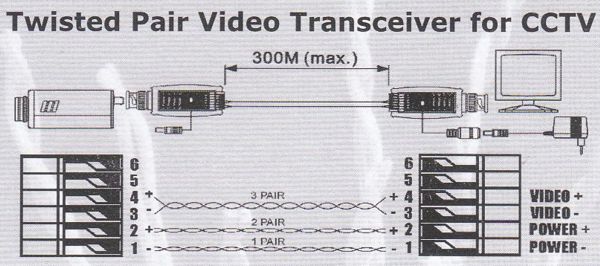
Video Baluns and Twisted Pair Video Transceivers for CCTV

From this diagram, learn how video baluns are used and applied in CCTV systems.


Friday, December 23, 2011

How to Install Large CCTV Systems Using Video Baluns and Rack Cabinets


A quick diagram on how to build large CCTV systems with video baluns and rack cabinets


Friday, December 9, 2011

How Videos are Transmitted Over Cat5 Cables: The Main Purpose of a Video Balun


By now, you all know that video baluns are primarily used with security cameras, the main reason being that a video balun can transmit signals, or in this case, videos, better over long distances than RG59 Coax Cables. RG59 Coax Cables are the standard cables used to transmit video signals from security cameras but with today’s technology, a better option has arrived in the form of a video balun.

A video balun works, basically, by converting a 75ohm signal to 100 ohm impedance for Cat5e cables and back. To do this, two video baluns are needed, each of which is attached to the end of the Cat5e cable. Aside from being more technologically-advanced than coax cables, video baluns can also help save time and energy when it comes to installation. No longer do you have to run coax cables from the 1st to the nth floor. All you have to do is use video baluns to install security cameras in commercial office buildings.

With video baluns, you have multiple pairs of wires, which is something you don’t really get with other types of cables. When you transmit video signals with Cat5e cables, you have 4 pairs of 22 gauge wires and one cable can already be used for 4 cameras. To avoid interference, security cameras installed with the video baluns should be powered by the cameras themselves or use a separate Cat5e cable instead.

When purchasing video baluns, you can choose an active or a passive video balun. You can also choose different formats depending on the video signal available. The most common form of video signal is the composite video so you will not have any trouble purchasing a video balun that suited for this. Cat5e cables, on the other hand, are better for extended signals in homes, classrooms, commercial establishments, and business settings.

Tuesday, November 29, 2011

The Ultimate Video Balun Solution

Your experts at PIMFG.com offers you the ultimate video balun solution. Learn more with this video.

Friday, November 25, 2011

A Quick Tutorial on Passive Video Baluns

For all you curious folks out there, here's a tutorial on passive video baluns - how to use it and make it work for your security systems.


Thursday, November 17, 2011

Learn How to Strip Cat5e Cable for Video Balun

With the right cutting tools, you can easily strip a Cat5e cable for video balun. The reason why a Cat5e has to be stripped so it can be inserted into the corresponding slots in the video balun to make it work. Find out how you can do it yourself to make your Cat5e cable match your video balun.

The Basic Features of Video Baluns


A video balun is used to wire security cameras because installers have the opportunity to have a more structured and cost effective cabling technique. With video baluns, UTP wires like Cat5 wires can be used in longer distances as compared to coax cables. Video baluns not only offer a wider range of distance but they also cost less than coax cables. An active video balun, for example, enables UTP wires to run distances of over 3,000 feet.
There are many features that a video balun offer, one of which is that it does not need power to operate. This is one reason why a video balun is cost-effective since no electricity is needed for it to function. Noise is filtered and impedance coupled devices are also built-in with video baluns. Installers and even the most technologically-inept individual no longer have to waste time crimping RJ-45 connectors because BNC coax is now used to screw terminals.
 Aside from all these features, video baluns are compatible with coax systems and can provide power and video over a single twisted pair. When it comes to the cost of video baluns, they are definitely much cheaper than Cat5 cables. CCTV video balun is one application where baluns are more practical as compared to using RG59 coax cable. This is because of the ability of video balun to transfer signal with less distortion for up to 3,000 feet and without costing too much. 
Video baluns are now available to match the different formats of video signals, the most common of which is composite video. Video baluns, when paired with Cat5 cables, can extend signals not only for homes and classrooms but for institutional and commercial settings as well. 

PIMFG.com offers a wide selection of video baluns – whether it is active video baluns or passive video baluns you need, PI Manufacturing, Corp. is sure to have them in stock.

Wednesday, August 10, 2011

Notes On Using A 4-Channel Passive Video Balun

First things first, what is a 4-channel passive video balun?

A 4-channel passive video balun is a specialized electrical transformer that converts differential electrical signals to unbalanced (also known as single-ended) electrical signals. A 4-channel passive video balun is used when dealing with radio frequencies. For example, when the length of the cable is too long, when it is unshielded or when it is mismatched in impedance, then there is a possibility of loss signal; this is where the 4-channel passive video balun comes in.

The majority of digital video security and surveillance cameras still use coaxial cable specifically the RG-59. The RG-59 is a shielded cable that has an impedance of 75 ohms and that has aluminum, mesh wires or even plastic sheath. These features prevent the loss of desired radio frequency in and prevent external noise from reaching the cable. Now, let’s talk about CAT5 or Ethernet cables. Ethernet cable has a twisted pair of wires that cancels out electromagnetic interference from external sources. It is also called UTP or short for Unshielded Twisted Pair cable because it contains no shield that prevents outside noise for radio frequency applications. Ethernet cables can also be used for video transmission lines for digital video security cameras, but it has an impedance of about 100 ohms. Since the camera is transmitting its video data at an impedance of 75 ohms and the DVR has to receive it at 75 ohms, then there is a clear mismatch between the Ethernet cable and everything else.

This is where a 4-channel passive video balun comes in. The video balun will correct the mismatch of ohms going to and from the cable; in addition, the balun may also correct for noise, white balance, and other video signal attributes. It also enables four different signals to be sent over one CAT5 cable that is up to 1200 feet in length. When using a 4-channel passive video balun, make sure to purchase two units. The first one converts the signal from BNC to CAT5 while the second video balun converts the CAT5 back to BNC so it can be used by the DVR.

Tuesday, August 9, 2011

Differentiating Passive from Active Video Baluns

Before we go discussing how to distinguish a passive from an active video balun, let’s have a refresher on what a video balun is. A video balun works by converting a balanced line to an unbalanced line and vice versa. The word “balun” is derived from two words = BAL (balance) + UN (unbalance). What makes a balanced line different from an unbalanced line is that it has two conductors and equal currents that run in opposite directions while an unbalanced line only has a single conductor and current that returns through a common ground.

A video balun functions in pairs, as one of the pairs is responsible for converting a balanced line to an unbalanced line while the other half converts the signal back. Through video baluns, signals transmitted are stronger and interference is minimal, making it extremely useful for surveillance purposes.

Passive video baluns offer less interference and degradation is minimal, making radio frequency signals transmitted stronger than others. These types of video baluns are used for their capacity to boost signal strength, making transition from one system to another seamless and noise-free. Some of the most common cables we use are Cat5E and RG59 coaxial cables.

RG59 coaxial cables are passive video baluns and are ideal for the digital video security industry. The only disadvantage to using RG59 coaxial cables is that they only have a working distance of 600 feet, whereas Cat5E cables’, another type of coaxial cables for passive video balun that is generally less expensive than RG59 cables, signals can be carried up to 1,000 to 2,000 feet. Installation of Cat5E cables is also easier. A single cable of Cat5E is equivalent to 4 RG59 cables for 4 security cameras alone.

Active video baluns, on the other hand, is different from passive video baluns because they operate through electricity. Power is needed to use active video baluns, which most use 12VDC. Active video baluns can boost signals up to 4,000-5000 feet.

Sunday, May 1, 2011

All About Video Baluns

What is a video balun?A video balun is a connecting device which converts a balanced electrical line to an unbalanced line and vice versa. It is also used as a cost efficient alternative to extending the distance of a security camera from 1,000 feet to up to 6,000 feet. This is achieved by using a Cat5e/A cable or another form of twisted pair wire (UTP) instead of the usual coaxial cable. With the help of a video balun, the UTP wire can be pulled for longer runs. A video balun comes in two’s. One is for converting the unbalanced line to a balanced line and the other is to convert the signal back. One key advantage of using a video balun is that the frequency transmits a stronger signal and thus has less of a signal interference. Basically, there are two kinds of video baluns—a passive video balun and an active video balun. However, the right kind of video balun to use mostly depends on the function. For example, a keystone video balun is more appropriate for behind the wall installations, while for your home theater, you will need a special HDTV balun. For industrial needs, a rackmount video balun will better support the requirements of a business. It helps eliminate tangled cables and simplifies the process of installation. Other common uses of video baluns include connecting security and surveillance systems, closed circuit television (CCTV) systems, televisions, computer monitors and laptops, USB devices and DVD players, among others.

There are three configurations by which video baluns can exist. If you use passive video baluns on both the camera and the monitor side, then there is no signal intensity change or amplification. This works for a maximum distance of 1,000 feet. If you use a passive video balun on the camera side and an active video balun on the monitor side, the receiving balun amplifies a weakened signal and transmits a stronger signal to the surveillance device. This set-up works for a maximum of 4,000 feet in distance. Finally, if you use an active video balun on both sides, the sending balun transmits a strengthened signal to the other end which then strengthens the signal and sends it to the surveillance device. This is good for a maximum of 6,000 feet in distance.

Want to know more about video baluns? Visit PIMFG.com.


Wednesday, January 26, 2011

Video Baluns – What Exactly Are They?

Video baluns are devices that are used to convert balanced lines to unbalanced lines and vice versa. Video baluns are electronic devices used in aerial and its feeder cable and other electrical circuit elements wherein one is balanced and the other is unbalanced. The difference between a balanced and unbalanced line is that balanced lines have two conductors having equal currents in opposite directions, whereas unbalanced lines only have one conductor and that the current returns via a common ground or earth path.

Video baluns come in pairs, with one converting balanced to unbalanced and vice versa, while the other converts the signal back. Video baluns function by transforming an unbalanced video signal to a balanced frequency that originates from a different cable. With video baluns, frequencies are then balanced, transmitting a stronger signal while preventing signal interference.

As mentioned, video baluns come in pairs. They also come in passive and active forms. For example, passive video baluns are available in 3- and 2-Pair Powers, both for the camera and monitor side for security cameras. These video baluns are also cost-efficient, increasing the distance of security cameras by 1000ft using a Cat5e or UTP Cable. Active video baluns are also available, requiring Cat5, Cat6, or phone cables to function. Some active video baluns can even provide signals for up to 6000ft.

Video baluns are commonly used in BNC or coaxial cables, security and surveillance systems, closed circuit television (CCTV) systems, and home theaters and television. They are also used in computer monitors, laptops, DVD players, USB devices, and unshielded twisted pair (UTP) cables.

PI Manufacturing, Corp. is an online wholesaler of video baluns and other computer cables. Browse through PIMFG’s wide selection of video balun products such as passive video baluns, active video baluns, video balun brackets, built-in video baluns and more.