Showing posts with label CCTV video balun. Show all posts

Thursday, May 31, 2012

Importance Of Acquiring CCTV Cameras


Crime does not pay!  With the rise of crime and terrorism in our country, security is now a top priority.  Locking your doors and securing your windows or just simply locking the vault would not solve the problem.  You have to have a CCTV camera that will document everything and eventually put a stop on those lawbreakers.  A high quality and dependable camera with a video balun will definitely come in handy.
But it doesn’t end with just having a security camera and a video balun.  You should also have the right cables, security camera systems, DVR surveillance and capture cards and a lot more.  Browsing through the World Wide Web will give you a better view of what you will need in order to have an effective and a top quality CCTV camera.
You will need to record what’s happening in your surroundings,thus a need for a DVR Surveillance System.  This will allow you to use more than 1 surveillance camera simultaneously and record whatever is happening at a given time.  This is where high quality video baluns come in handy.  It extends your security camera setup to a maximum of 6000 feet.
Security is a high priority and so is purchasing the right equipment.  Don’t look at price but check the supplier’s credibility in the industry.  Join forums or subscribe to newsletters to get the most up to date industry news that will help you in deciding what to get.
Acquiring CCTV cameras is without a doubt very important to any business, house or even in schools.  These security cameras will put a stop on any illegal activities or any acts of terrorism.  It reduces disorder and restores peace and order in a community.  Its value is indeed immeasurable.

Wednesday, February 29, 2012

How to Use a Computer Monitor for CCTV Security Cameras


Earlier, we taught you how to be more practical by using computers to monitor your home surveillance systems. Our previous post focused on wireless security cameras and it is amazing how technology makes everything so easy nowadays. With just a simple click, you can easily monitor your home using a wireless security camera.

If, however, you opt for CCTV security cameras, you will need a different configuration and you probably will have to purchase additional hardware to connect your camera to your computer. You may not use video baluns in this case because there are different cables that you need. It’s not that difficult. Find out how:

1. The first thing you have to do is to purchase a video-to-VGA converter box. Analog video data on computers are displayed using VGA inputs but with CCTV security systems, they use standard video ports similar to those used by television sets. Unfortunately, they do not have native compatibility so you have to buy a video-to-VGA converter box in order to use your CCTV security camera.

2. A VGA switch box is another thing that you have to buy. Because a monitor only has one video port, you will need a VGA switch box so you can easily switch between the camera and computer video feeds.

3. A CCTV security camera has a video feed cable which you should attach to the video-to-VGA converter box. Additionally, you should also attach a VGA cable between the converter box and VGA switch box.

4. Now, the computer’s monitor cable should also be plugged into the other port of the VGA switch box. Another VGA cable from the switch box should be attached to the computer monitor as well.

5. You can now monitor your home using your computer simply by switching the feed from the computer to the camera. This way, you can still multitask and do other things on your computer while switching to the camera feed from time to time.

Tuesday, February 28, 2012

CCTV Camera: Back to Basics

If by now you have noticed how we’ve been going on and on about CCTV cameras without actually offering an introduction to what it really is, then we do apologize sincerely. This week, we shift our focus to CCTV cameras as we share interesting facts about one of the most useful tools for businesses and residential locations. Of course, CCTV cameras work best if you have video baluns and other necessary parts available. CCTV video baluns are also available in the market today. Before we delve deeper, first let us discuss the importance of a CCTV camera.

Aside from commercial and residential establishments, major cities are now investing heavily on CCTV cameras to keep close watch on what goes on in the streets when citizens think no one is looking. Of course, as you all know, the primary purpose of a CCTV camera is to provide surveillance. Crimes are so much easier to solve with evidence from a CCTV camera. Aside from being a watchful eye, a CCTV camera can also prevent an individual from doing a crime. Imagine planning something evil only to find out that the store or house actually has a CCTV camera. Nope, those plans will be thwarted soon enough.

CCTVs, when it first developed in 1970s, were actually analog in nature. In today’s world, there are rare technologies that are still on the analog type and CCTVs have evolved to keep up with digital evolution. With digital CCTV systems, they become easier to manage as there is no longer the need for large cable systems to transmit and encode data.

Of the 25 million CCTVs in the world today, 2.5million of those are found in the United Kingdom. According to the numbers, the average citizen is caught on CCTV cameras at a rate of 300 times a day, and that is just in major cities like London.

Today, CCTVs play a large role in preventing theft, robbery, and other major crimes. In fact, it has been a useful tool in identifying the perpetrators of the July 2005 bombing in London. Setting up a CCTV camera system for your home is a wise idea. With the right tools and parts such as video baluns, it won’t be long until your home or business is protected from evildoers.

Tuesday, January 24, 2012

Install CCTV Systems Successfully with These Tips (PART II)

Earlier, we taught you how successfully install CCTV systems by sharing a few tips. Of course, installing CCTV systems mean that you have to purchase the necessary parts such as security cameras and video baluns for the system to even function properly. With good planning, CCTV system installation should prevent future problems though troubleshooting is inevitable with years-old security systems.

While the first part of our series discussed the importance of doing proper research, canvassing the area, and checking for nearby power sources, we now conclude by detailing why security lighting, camera considerations, and choosing between cabled or wireless camera is a crucial part in successfully installing CCTV systems.

The reason why you want to install a CCTV system is to make sure you are always safe and that no intruders will come into your home, especially during at night. Having enough security lighting is important if you want the system to be turned on at night. This means that you either have to make extra lighting available or choose a security camera with low lux ratings or Infrared capability.

As CCTV systems are traditionally installed outdoors, they have to be enclosed in a weather-proof protective casing to safeguard them from external elements that could potentially damage the system. Additionally, it is necessary to choose the right security camera for the type of climate in your region because there are certain security cameras that cannot withstand extreme temperature changes.

Finally, cables are necessary parts of any CCTV installation system. Some CCTV installers find it time-consuming to run cables from the camera to the control point. Wireless systems now eliminate the necessity of extensive cabling; however, the camera has to be within range and minimum obstacles should block the signal between the camera and receiver. Video baluns make long distances possible without loss of signal and transmission.

Wednesday, December 28, 2011

Determining What Video Baluns to Based on Distance

Find out what is the best combination for active and passive video baluns to use based on the distance required for your CCTV system.


Monday, December 26, 2011

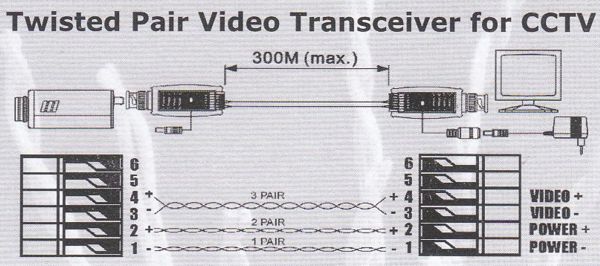
Video Baluns and Twisted Pair Video Transceivers for CCTV

From this diagram, learn how video baluns are used and applied in CCTV systems.


Thursday, November 24, 2011

The Benefits of Using a 4 Channel Passive Video Balun

Today, many security equipment and surveillance cameras still use coaxial cables, specifically RG-59, which is a shielded cable that has an impedance of 75 ohms. By impedance, we are talking about the measure of the opposition from an electrical circuit to the passage of the current as voltage is applied through it. Shielded cables are wrapped, most commonly in aluminum, mesh wires, and plastic, preventing external noise from reaching the cable. Additionally, with shielded cables, the desired radio frequency is kept inside the cable. With an impedance of 75 ohms, ideal quality videos will only result if the objects that transmit the signal also have the same impedance of 75 ohms.

Cat5 cables, on the other hand, are more recent technological innovations, which have twisted pairs of wires. The twisting of the pairs actually allows electromagnetic interference from external sources to be canceled out. The problem with Cat5 cables though, is that it is unshielded, which means that there is no shield to prevent outside noise which comes in the form of electromagnetic radiation. This is another reason why Cat5 cables have a different name – UTP cables which stand for Unshielded Twisted Pair cable. Cat5 cables also differ from coaxial cables in one thing: it has an impedance of 100 ohms. 

The camera that has an impedance of 75 ohms and the DVR that intends to receive it at 75 ohms means that Cat5 cables are a mismatch with both the camera and the DVR, along with everything else. How do we solve this problem?

A 4 channel passive video balun is the best way to prevent loss of information that is brought about by lengthy, unshielded, or mismatched cables. With a 4 channel passive video balun, the mismatch of ohms going to and from the cable will be corrected. Additionally, external noise cancellation is also prevented as well as other video signal attributes such as white balance. A 4 channel passive video balun is specifically designed to solve these problems and fortunately for us, they come at a cheap price.

Video baluns are used in CCTV systems and some of the pieces we are familiar with include active video baluns, HDTV baluns, keystone video baluns, and rackmount video baluns. 

Thursday, November 17, 2011

The Basic Features of Video Baluns


A video balun is used to wire security cameras because installers have the opportunity to have a more structured and cost effective cabling technique. With video baluns, UTP wires like Cat5 wires can be used in longer distances as compared to coax cables. Video baluns not only offer a wider range of distance but they also cost less than coax cables. An active video balun, for example, enables UTP wires to run distances of over 3,000 feet.
There are many features that a video balun offer, one of which is that it does not need power to operate. This is one reason why a video balun is cost-effective since no electricity is needed for it to function. Noise is filtered and impedance coupled devices are also built-in with video baluns. Installers and even the most technologically-inept individual no longer have to waste time crimping RJ-45 connectors because BNC coax is now used to screw terminals.
 Aside from all these features, video baluns are compatible with coax systems and can provide power and video over a single twisted pair. When it comes to the cost of video baluns, they are definitely much cheaper than Cat5 cables. CCTV video balun is one application where baluns are more practical as compared to using RG59 coax cable. This is because of the ability of video balun to transfer signal with less distortion for up to 3,000 feet and without costing too much. 
Video baluns are now available to match the different formats of video signals, the most common of which is composite video. Video baluns, when paired with Cat5 cables, can extend signals not only for homes and classrooms but for institutional and commercial settings as well. 

PIMFG.com offers a wide selection of video baluns – whether it is active video baluns or passive video baluns you need, PI Manufacturing, Corp. is sure to have them in stock.

Wednesday, March 16, 2011

Using CCTV Video Balun to Transmit Video Over a Cat5 Cable

When transmitting a video signal for your security camera over long distances, a Cat5 cable is ideal. This kind of situation is perfect for using a CCTV video balun, otherwise known as a UTP balun. What does a video balun do? It converts a 75 ohm video signal over to the correct 100 ohm impedance for the Cat5 cable and then back to the 75 ohm video signal again. Aside from a Cat5 cable, a CCTV video balun also allows other forms of twisted pair wire in CCTV video camera and surveillance installations. In addition, a video balun is more cost efficient because installers can run over long distances easier than a coax cable for less money. In fact, an active video balun transceiver can extend wires for surveillance cameras for up to 3,000 feet.


Aside from being a money saver, using a CCTV video balun is a time saver too. Instead of running a coax cable from all the way up, you can just check for unused Cat5 phone lines. Phone lines are cost efficient when it comes to wiring. As an installer, using a phone line means that you just have to unscrew the face plate, strip the phone cable wires and connect it to the balun. When it comes to stripping, the more economical video baluns will require wire stripping and an individual wire connection. For this, you will need a cable stripper. However, if you are using a “fancier” balun, you will notice that it usually has a built in port for easier connection directly from a cable with a connector. Using a CCTV video balun also gives you multiple pairs of wires. Ordinarily, you will have four pairs of 22 gauge wires so you can use one cable for four cameras. A word of caution, though. Do not forget to either power the security camera at the camera itself or use a separate Cat5 cable to avoid interference.